
Best Webcams & Capture Cards for YouTubers & Content Creators (2026)
Best Webcams & Capture Cards for YouTubers & Content Creators (2026)
Top Picks
If you want quick, reliable results without spending hours comparing specs, these are the most dependable options for creators.

HP 320 FHD Webcam
- Full HD 1080p at 30fps for sharp video clarity.
- 66° field of view with 360° swivel and tripod support.
- USB-A plug-and-play; works with Windows, macOS, and Chromebook.
Why we picked it: A reliable and budget-friendly webcam that delivers crisp video quality for YouTubers, online teachers, and streamers.
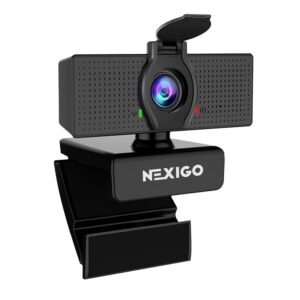
NexiGo N930AF 1080p Webcam
- Video: Full HD 1080p at 30fps for clear, detailed streams and recordings.
- Wide view & optics: Wide-angle lens (approx. 110°) for roomy framing — good for single presenters and small group shots.
- Audio & low-light: Built-in microphone with basic noise reduction and automatic low-light correction for cleaner video in dim rooms.
Why we picked it: A reliable mid-range webcam that balances strong field-of-view, clear 1080p output, and easy plug-and-play setup — ideal for streamers, teachers, and creators who need a flexible camera without a big budget.
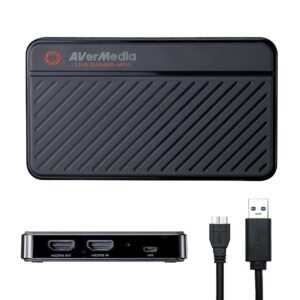
AVerMedia Live Gamer Mini GC311
- Full HD 1080p at 60fps capture & zero-latency HDMI pass-through — perfect for streamers using consoles or cameras. :contentReference[oaicite:1]{index=1}
- Compact form-factor (only ~74.5 g) and plug-and-play USB interface — ultra portable for mobile creators. :contentReference[oaicite:2]{index=2}
- Hardware H.264 encoding offloads your CPU, enabling smoother recording with less system strain. :contentReference[oaicite:3]{index=3}
Why we picked it: This capture card offers serious performance in a small package — great value for Youtubers and streamers in India who want DSLR-level capture without overpaying.
Budget Breakdown
Best Webcams & Capture Cards by Budget
Under 3,000 Rupees
Perfect for beginners, online classes, Zoom calls, and simple YouTube videos.
Expect decent clarity, smooth autofocus, and acceptable low-light performance.
3,000 – 10,000 Rupees
The sweet spot for most creators.
Webcams in this range offer sharper video, 1080p clarity, better microphones, and strong low-light optimization.
Capture cards in this range provide stable 1080p/60fps input for DSLR or mirrorless cameras.
Above 10,000 Rupees
Ideal for serious YouTubers, streamers, and educators.
Expect crisp 1080p/60fps or even 4K recording, accurate skin tones, HDR, robust software control, and professional-grade capture cards.
Explore All Webcams & Capture Cards
Below is a complete list of webcams and capture cards across all budgets. Choose based on your shooting style, room lighting, and how professional you want your setup to look.
AUSDOM AF640 1080p Webcam
- Full HD 1080p video with wide-angle (~110°) lens for broad framing.
- Dual built-in microphones + noise reduction — ideal for streaming and conferencing.
- USB-A plug-and-play — works easily with laptops, PC, and streaming setups.

Logitech C920 HD Pro Webcam
- Full HD 1080p at 30fps with a premium glass lens for crisp, detailed video.
- Dual stereo microphones and auto light correction for clear audio and balanced exposure.
- USB-A plug-and-play with a stable mount and tripod compatibility.
Dell UltraSharp 4K Webcam WB7022
- 4K UHD (3840×2160) video capture with HDR + Sony STARVIS sensor.
- Adjustable field of view (65°, 78°, 90°) + AI auto-framing + privacy shutter.
- USB-C/USB-A support, magnetic mount, tripod compatible — premium build for creators.
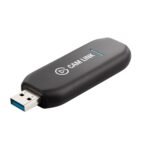
Elgato Cam Link 4K
- Converts DSLR, mirrorless, or action cameras into a high-quality 4K webcam.
- Supports 4K30 and 1080p60 input — ideal for streaming, YouTube, and tutorials.
- Ultra-low latency with plug-and-play USB — simple, reliable, creator-friendly.
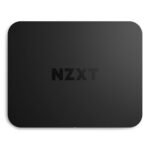
NZXT Signal HD60 Capture Card
- Captures 1080p at 60fps for smooth, high-quality recording and streaming.
- Zero-lag HDMI pass-through — ideal for gaming, DSLR setups, and live content.
- Compatible with PC, consoles, and popular streaming software; simple plug-and-play design.

Razer Ripsaw HD Capture Card
- Supports 1080p at 60fps for smooth high-quality recording and streaming.
- HDMI inputs and passthrough minimize latency — perfect for live gameplay and tutorials.
- Plug-and-play setup with USB-C interface, compatible with PC and gaming consoles.
If you want to explore additional models, compare specs, or browse more creator-friendly choices, check out the full list of webcams and capture cards we’ve reviewed.
How to Choose the Right Webcam or Capture Card
Choosing the right webcam or capture card depends on your lighting, room size, content format, and whether you use a DSLR or stay on a built-in camera. Here are the key factors to consider:
1. Resolution & Frame Rate
Look for at least 1080p. If you record fast movements or stream gameplay, 60fps makes a big difference.
2. Autofocus & Low-Light Performance
A webcam that performs well in dim rooms gives a cleaner, noise-free image.
3. Mounting Options
Tripod compatibility helps position the camera exactly where you want it.
4. Connectivity (USB-A / USB-C)
Newer webcams support USB-C for more stable bandwidth and faster data.
5. Field of View (FOV)
Narrow (60–78°) looks more cinematic.
Wide (90°+) works well for teaching and showing your setup.
6. Microphone Quality (If You Use Built-In Audio)
Dual-mic setups sound noticeably better for calls and tutorials.
7. Capture Card Compatibility
If you plan to use a DSLR, ensure the capture card supports your camera’s output resolution and refresh rate.
8. Software Control
Exposure, ISO, color correction, cropping — good software gives you more creative control.
Frequently Asked Questions (FAQ)
1. Do I need both a webcam and a capture card?
No. You only need a capture card if you want to use a DSLR/mirrorless camera. Basic creators can start with just a webcam.
2. Is 720p still usable?
Yes — for basic calls and simple screen recordings.
For YouTube and streaming, 1080p is recommended.
3. Does a capture card improve webcam quality?
No. Capture cards are only for external cameras.
4. Do webcams work well in low light?
Better webcams handle low-light much cleaner, but adding a basic ring light makes a huge improvement.
5. Should I choose 60fps?
If you record movement, gameplay, tutorials, unboxings — YES.
For talking-head videos, 30fps is fine.
Explore More Creator Gear
Webcams and capture cards are just one part of building a complete creator setup. If you want to explore microphones, cameras, tripods, lighting, and more — check out all our creator gear categories.